Add-ons
More RAM, vCPUs, disk, transfer or IPv4 addresses on top of your plan. What each one costs, how it's applied, and what happens when you add or remove one.
To add RAM, vCPUs, disk, transfer or IPv4 addresses to a server, pick them at the order form's Add-ons step, or later on the server's Add-ons tab; more is charged for the rest of the paid period, and less takes effect from the next renewal. An add-on puts more of one thing on a server without moving it to a bigger plan. Prices are on the plans page.
What you need
- A server, or an order in progress. In a team, changing add-ons needs a role that can order servers.
- For extra RAM or vCPUs, a moment when a restart suits you.
| Add-on | Sold in | Most you can add (Budget / Standard / Extreme) | Applied |
|---|---|---|---|
| Extra RAM | 1 GB | 2 / 4 / 8 GB | with a restart |
| Extra vCPU | 1 core | 1 / 2 / 4 | with a restart |
| Extra NVMe | 20 GB | 80 / 160 / 320 GB | live |
| Transfer pack | 1 TB a month | 4 / 8 / 16 TB | at once, in billing |
| Extra IPv4 | 1 address | 1 / 2 / 4 | live, then you configure it |
If the add-ons you want cost about as much as the next plan up, take the bigger plan instead. It gives you more of everything.
Where you see them
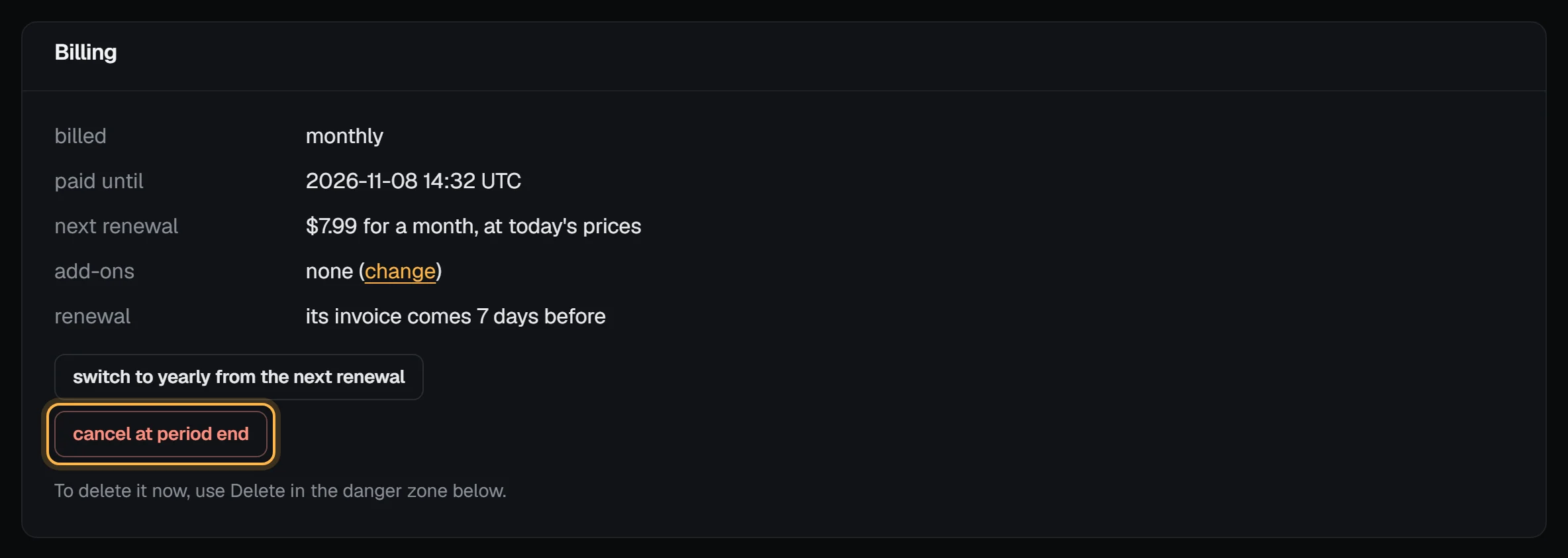
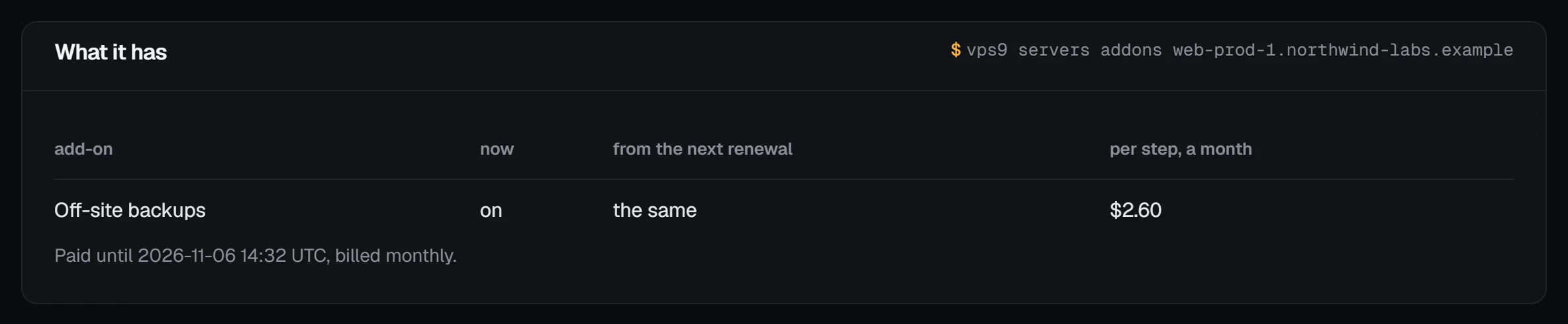
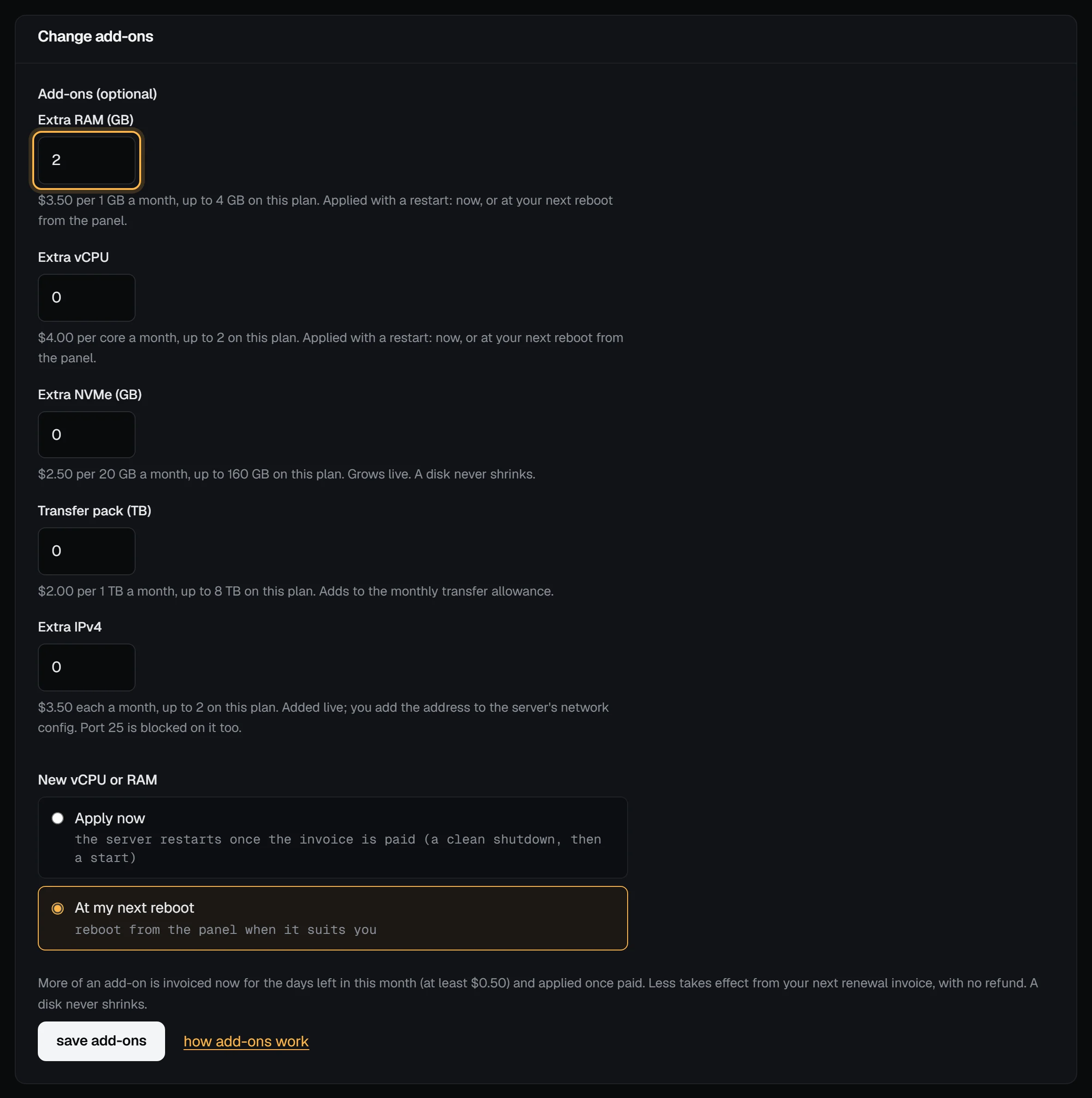
The server's Settings tab lists its add-ons in the Billing box, with a change link to the Add-ons tab. The Add-ons tab shows what the server has (What it has) and the form to change it (Change add-ons).
How they're billed
Add-ons are billed with the server, for the same term. On a monthly server they're monthly; on a yearly one they're yearly, and a yearly add-on costs 10 times the monthly price. Your renewal invoice lists the plan and each add-on on its own line.
Adding more is charged straight away, for the days left in the period you've already paid for. A day that has started counts as a day. The invoice is never less than $0.50. The add-on is applied once that invoice is paid. If your renewal invoice has already gone out, the add-on invoice covers the next period too, so you don't pay for it twice or miss it.
Taking some away takes effect from your next renewal invoice. Nothing changes before then, and there's no refund for the period you've paid for. You can change your mind before that invoice is issued. Once it's issued at the lower size, it stays that way: change it again after it's paid.
One add-on invoice can be open per server at a time. If you don't pay it within 7 days, or your renewal invoice is issued first, it lapses and nothing changes.
Extra RAM and vCPUs
New memory and cores need the server to restart. When you add them you choose:
- Apply now: once the invoice is paid, we shut the server down cleanly and start it again. That takes about a minute. If it doesn't shut down within a minute, we turn it off.
- At my next reboot: nothing restarts until you say so. Use reboot (or stop, then start) in the panel or the API when it suits you.
A reboot from inside the server, like sudo reboot, keeps the old size. The panel shows a note until a reboot from the panel has applied it. Check the result with nproc and free -h.
When you lower RAM or vCPUs, the change happens when your next renewal is paid. The smaller size is set straight away and applies at your next reboot from the panel or the API. If the server is still running the old size 72 hours after the renewal was paid, we restart it then (a clean shutdown, turned off after a minute if it doesn't stop, then a start). We email you the time when the renewal is paid, and the add-ons page shows it. Restart it from the panel sooner if a quieter moment suits you.
Extra disk
The virtual disk grows at once, while the server keeps running. The partition and filesystem inside it grow at the next boot. To use the space now, without a reboot:
sudo growpart /dev/vda 1
sudo resize2fs /dev/vda1      # ext4: Debian, Ubuntu
sudo xfs_growfs /             # xfs: AlmaLinux, Rocky, Fedora
Check with df -h /. A disk never shrinks, so extra disk can't be taken away once it's added.
Reverting to a snapshot taken before the disk grew keeps the bigger disk, but the partition and filesystem are back to the snapshot's size. Grow them again with the same growpart and resize2fs (or xfs_growfs) lines, or reboot.
Extra IPv4 addresses
The address is routed to your server as soon as the invoice is paid, and the server's add-ons page shows it. Your server doesn't know about it yet, so you add it yourself. The page gives you the exact lines for that address. For 203.0.113.20/24 they look like this:
# Right away, until the next reboot (find your interface with: ip -br link)
sudo ip addr add 203.0.113.20/24 dev eth0
To keep it, add it under addresses: in /etc/netplan/50-cloud-init.yaml and run sudo netplan apply (Ubuntu, Debian). With NetworkManager (AlmaLinux, Rocky, Fedora), use nmcli con mod "<connection>" +ipv4.addresses 203.0.113.20/24 and then nmcli con up "<connection>". A reinstall sets up every address for you.
Outbound port 25 is blocked on extra addresses too, just like on the main one. See open port 25 if you need to send mail. You can set reverse DNS for the main address.
When you lower the number of extra addresses, the newest one goes at your next renewal. Take it out of your network settings first.
Transfer packs
Each pack adds 1 TB to the server's monthly transfer allowance. The usage graphs on the server's page show your allowance with the packs included, and how much of it you've used this month.
Using the API
GET /api/v1/servers/<id>/addons shows a server's add-ons, and PUT /api/v1/servers/<id>/addons changes them, for example {"addons": {"ram_gb": 4}, "apply": "reboot"}. When you order with POST /api/v1/servers, send addons too. GET /api/v1/prices lists every price and needs no token. The API reference has the details.
Next steps
- Choose a plan: a bigger plan can cost less than many add-ons.
- Server settings
- Check that IPv6 works
Not available yet
A dedicated IPv6 /64 per server isn't available yet. Every plan includes one IPv6 address, but our IPv6 allocation is still being approved, so servers have an IPv4 address only until it's in place. Snapshots are free, up to three per server, but they stay on the server's host and aren't backups. Off-site backups are a separate add-on, priced per plan: Off-site backups says whether they're on sale yet.